Appearance
FeynmanLM
The problem
You read articles and papers. You listen to podcasts and read books. All of this to make sense of the world, but just throwing stuff at the wall and seeing what sticks is not an effective way to remember any of it.
The research is clear: quizzing yourself is the single most effective way to learn. Not re-reading, not highlighting, not summarizing. Actively testing your recall. And the Feynman Technique takes this further: if you can't explain something simply, from scratch, you don't actually understand it.
But there's a second problem beyond retention: tracking all your content. As Andy Matuschak explores in How Might We Learn?, the tools we use for learning are far behind the tools we use for everything else. You consume across dozens of sources and formats, and none of it is connected.
How FeynmanLM fits in
Today, learning and research is fragmented across a stack of disconnected tools: reference managers (Paperpile, Zotero), reading lists (Matter, Pocket), note-taking apps (Notion, Obsidian), and flashcard apps (Anki, Mochi). None of them talk to each other, and none of them were designed for how we actually learn.
FeynmanLM brings all your sources into one place and gives you a daily learning loop: plan sources in Schedule, read or listen to them, then review them with an AI tutor. You can use Claude, ChatGPT, Gemini, Grok, or Edison Scientific, or stay inside FeynmanLM with the in-app Chat panel.
The workflow is simple:
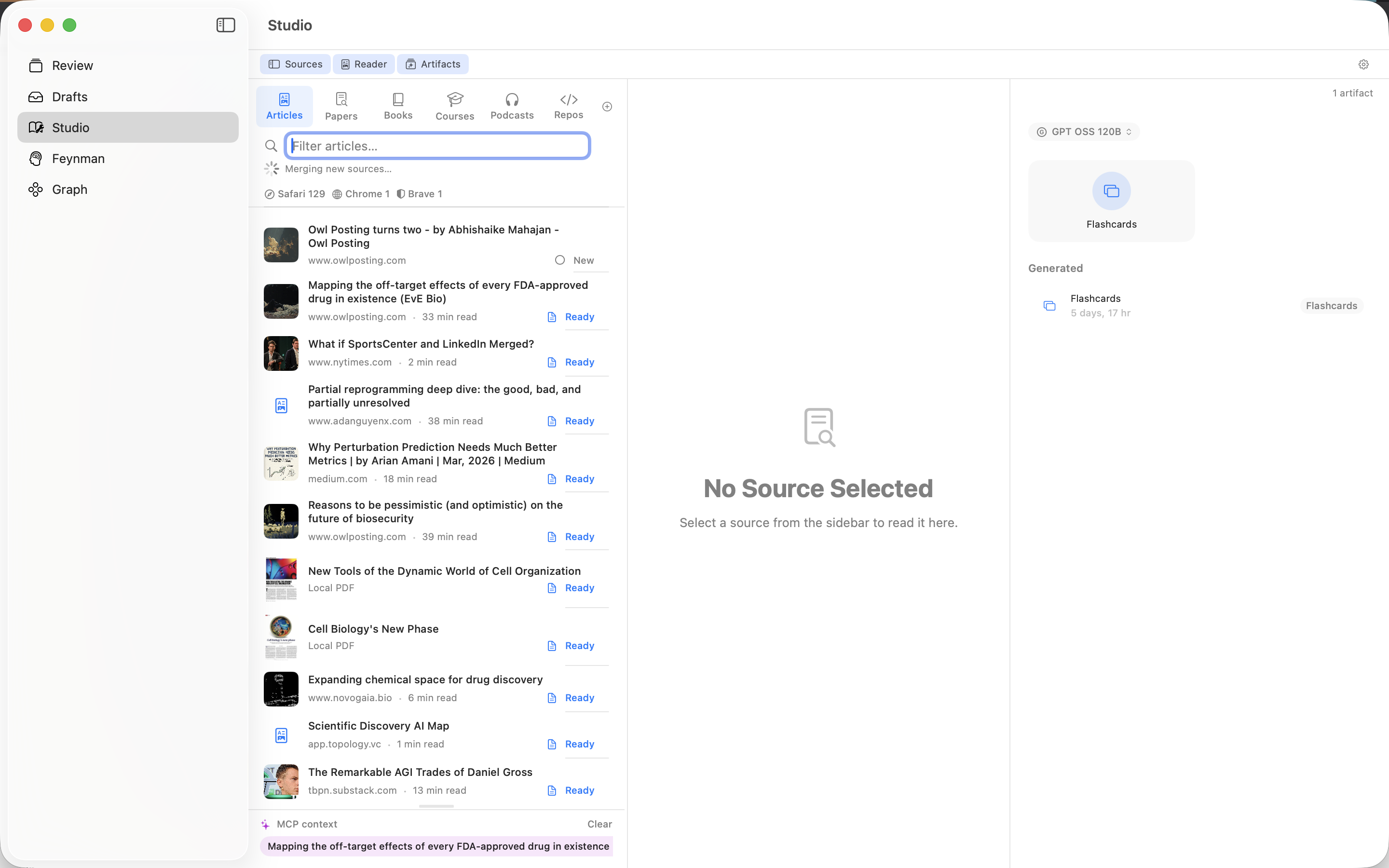
- Track sources in the Studio tab — articles, papers, podcasts, books, and more flow in automatically from your browser reading lists, local files, and integrations.
- Plan the week in Schedule — assign sources to each day, move them when plans change, and track progress as reviews are completed.
- Read, listen, and chat — use the Reader, Read Aloud, or in-app Chat to work through the day's sources.
- Learn through dialogue — ask your AI to test you, probe your understanding, and challenge your explanations using the Feynman technique and Socratic dialogue.
For a persistent connection where your AI can search your entire library without dragging, you can optionally set up the hosted MCP server. MCP traffic passes through FeynmanLM-operated Cloudflare infrastructure.
Your knowledge base lives in your private iCloud container. FeynmanLM servers do not store your source library, but data you choose to send to AI providers or through the hosted MCP relay follows those connection paths.
Quick Links
Track your sources:
- Studio Overview: how sources enter and how the Studio tab works
- Schedule: assign sources to days and track review progress
- Read Aloud: listen to articles and text sources
- Articles, Papers, Books, Courses, Podcasts, X Posts, Connectors
Choosing a learning tool?
- FeynmanLM vs Alternatives: honest comparisons with NotebookLM, Heptabase, Anki, RemNote, Readwise, Obsidian, Recall, Snipd, and more
Use with AI:
- In-App Chat: review sources inside FeynmanLM with your configured API provider
- Drag & Drop: drag your sources into Claude, ChatGPT, Gemini, Grok, or Edison Scientific — no setup needed
- Setup MCP Server: optional persistent connection for full-library access
- Learning with MCP: how to use AI for Feynman technique review and Socratic dialogue